Membuat Buku Tamu Tersembunyi Di Blog

Kali ini saya ingin berbagi trik memperbagus/memperindah blog dengan membuat buku tamu yang tersembunyi.Seperti yang saya punya di sidebar.Kenapa ini bisa memperindah,Karena Buku Tamu ini tidak terlalu memakan tempat di blog sobat.

Baiklah tanpa basa-basi lagi kita lihat langkah-langkah Membuat buku tamu ini


  1. Log-in Ke Blogger anda
  2. Pilih Design
  3. lalu pilih Add a Gadget
  4. setelah itu pilih Html/Javascript
  5. Kemudian Copy&Paste Kode ini di Kotak Html Tersebut 
<style type="text/css">#gb{position:fixed;top:50px;z-index:+1000;}* html #gb{position:relative;}
.gbtab{height:100px;width:30px;float:left;cursor:pointer;background:url('https://blogger.googleusercontent.com/img/b/R29vZ2xl/AVvXsEhNYcZpUx7z6X7GdW4q1PuIIDBxNgbkPqR6thIN8a92PiUg4VdnAnCu9pscDbYlRdfuVGlVmB_mfDJz6iKQfqWQHvs8lxRrK-tDcDaujA0XvZZTJwpf5-kMvtU1tojcz4TPVg6fxZ5lyHqN/') no-repeat;}.gbcontent{float:left;border:2px solid #A5BD51;background:#F5F5F5;padding:10px;}</style>
<script type="text/javascript">function showHideGB(){var gb = document.getElementById("gb");var w = gb.offsetWidth;gb.opened ? moveGB(0, 30-w) : moveGB(20-w, 0);gb.opened = !gb.opened;}function moveGB(x0, xf){var gb = document.getElementById("gb");var dx = Math.abs(x0-xf) > 10 ? 5 : 1;var dir = xf>x0 ? 1 : -1;var x = x0 + dx * dir;gb.style.right = x.toString() + "px";if(x0!=xf){setTimeout("moveGB("+x+", "+xf+")", 10);}}</script>
<div id="gb">
<div class="gbtab" onclick="showHideGB()"> </div>
<div class="gbcontent"><Ganti dengan kode Shoutbox/Cbox Anda di sini> 
<div style="text-align:right">

<a href="http://rizkieyudha.blogspot.com/2011/05/membuat-buku-tamu-tersembunyi-di-blog.html">
[Cara Buat Widget Ini]
</a>|<a href="javascript:showHideGB()">
[tutup]
</a>
</div>


<script type="text/javascript">var gb = document.getElementById("gb");gb.style.right = (30-gb.offsetWidth).toString() + "px";</script></div>

Jika anda Telah Selesai Klik Save Widget dan Lihat Blog anda sekarang

Free download Windows 8


Satu Lagi Os [operation System] yang sedang ditunggu Oleh para pengguna Microsoft . Versi Terbaru windows ini dikatakan mempunyai Tambahan yang anggi Berupa Kursor 3dnya.

dan yang pasti Windows 8 ini sebagai penyempurnaan dari Windows 7, di karenakan Windows 8 ini hampir sama dengan Windows 7 namun Windows 8 ini memiliki banyak fitur baru yg lebih bagus pasti nya .


Berikut beberapa fitur dari si WINDOWS 8 ini :


* Show File Extensions 
* Automatic Defragmentation With Diskeeper 
* Baru cmd File untuk Right Click 
* Diaktifkan Cari Sistem Folder di Cari 
* ClearType
* Windows Apakah Katakan Kau Tepat Apa itu Melakukan Apabila Shutting Down atau Boot 
* Meningkatkan Throughput Jaringan 
* Banyak tweak untuk IE8 
* Banyak tweak untuk W7 ... Desain:
* New Windows 7 Theme 
* New Start Button 
* New Cursor 3D 
* New Hd Wallpaper 
* Baru Sistem Hd Ikon Terpadu Dalam Sistem 
* Account Pengguna Baru Pics 
* New Windows Skema Sounds 
* New Logon Screen 
* Toos tambahan Terpadu Dalam Sistem: 
* SPTD Ekstra: 
* Cursor Fx + Cursor 3D (terpisah opsional)


ini Adalah Tampilan DESKTOP WINDOW 8 Yang di Bocorkan Microsoft


Kalo Sobat Ingin Mendownload Bisa Melalui Link Dibawah ini:
Part 1
Part 2
Part 3

Free Download EditPlus v2.10a+Keymaker

Nah,malam ini saya mau share software lagi yang tentunya gratis untuk pengunjung blog ini.Kali ini saya ingin share software EditPlus v2.10a+Keymaker yang berarti software yang saya share ini tidak TRIAL karena saya sudah memasukan keymaker untuk Software ini.

sebenarnya apa sih kegunaan software EDITPLUS ini,Lihat penjelasannya dulu di bawah ini.


EditPlus Icon
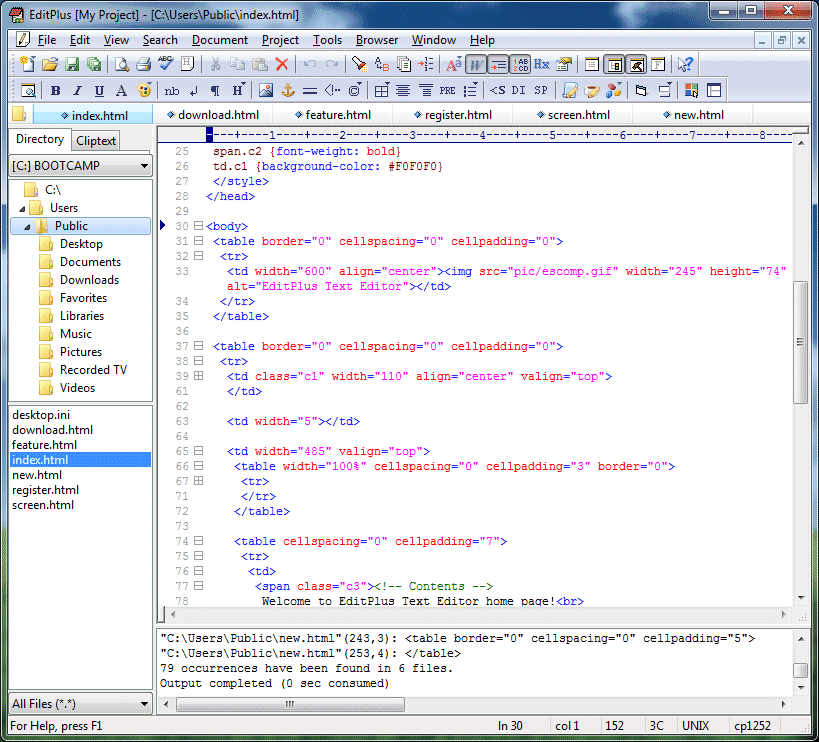
EditPlus adalah editor teks, editor HTML, PHP editor, Java editor dan Hex Viewer untuk Windows. Meskipun dapat berfungsi sebagai pengganti Notepad yang baik, itu juga menawarkan banyak fitur canggihuntuk penulis halaman web dan programer.
EditPlus Text Editor
(Click for full-size image) 

  • Sintaks HTML, PHP, Java, C / C + +, CSS, ASP, Perl, JavaScript dan VBScript. Selain itu, dapat diperpanjang untuk bahasa pemrograman lainnya berdasarkan sintaks file kustom. 
  • Seamless Web browser untuk melihat pratinjau halaman HTML, dan perintah FTP untuk mengupload file lokal ke server FTP.
  • Fitur lain termasuk Hex Viewer, HTML toolbar, pengguna alat-alat, nomor baris, penggaris, URL menyoroti, penyelesaian otomatis, cliptext, seleksi kolom, pencari yang kuat dan mengganti, multiple undo / redo, spell checker, cara pintas keyboard disesuaikan, dan banyak lagi.


Untuk cara penginstalan & Aktivasi Software ini bisa di lihat di bawah ini....

-------------------------------------------------------------------------------------------------------------

Pertama Extract dulu EditPlus v2.10a+Keymaker_rizkieyudhablogspotcom.rar ke folder yang di kehendaki,dalam contoh ini saya memberi nama folder adalah EditPlus v2.10a

Lalu Buka Folder EditPlus v2.10a dan jalankan ep2setup.exe

 Klik Setup untuk memulai instalasi

Ikuti Proses instalasi Sampai Selesai

 Jika Proses instalasi sudah selesai secara otomatis akan mucul windows seperti ini:


Tahap selanjutnya buka folder Keymaker yang ada di folder EditPlus v2.10a.
lalu Double Click di damn_editplus210a.exe


 Lalu akan windows seperti ini.
Klik Yes Untuk masuk kedalam EditPlus Keymaker


 Isikan kolom Username dengan nama yang ingin digunakan 
untuk mendapatkan Registration Codenya

Lalu Klik Generate It.
Secara otomatis Registration Code akan muncul,Copy code Tersebut lalu buka EditPlus.exe


Setelah anda membuka EditPlus.exe
akan muncul Kotak kecil untuk aktivasi EditPlus.Isikan Dengan username dan Registration code Dari EditPlus Keymakernya,Lalu Klik Register

Selamat Dengan ini anda sudah mempunyai EditPlus v2.10a yang Bukan Lagi Trial

-------------------------------------------------------------------------------------------------------------


Bagaimana.anda tertarik untuk mendownload software ini.

Download Link:
Password : rizkieyudha.blogspot.com
>>>>>>>Click Here To Download<<<<<<< [4 Shared]

Free Download Artisteer 2.3.0.25189 Final With Keygen


What is Artisteer

Artisteer is the first and only Web design automation product that instantly creates fantastic looking, unique website templates and blog themes.
  • Design awesome WordPress Blogs, professional Joomla! and Drupal templates, and cool Website designs in Minutes
  • Easy to use
  • Export as Wordpress Theme or CMS Template
With Artisteer YOU immediately become a Web design expert, editing and slicing graphics, coding XHTML and CSS, and creatingWeb Design TemplatesJoomla TemplatesDrupal Themes, and WordPress Themes - all in minutes, without Photoshop or Dreamweaver, and no technical skills.

and now I want to share Free Download Artisteer 2.3.0.25189 Final With Keygen

Download Link
.Rar password rizkieyudha.blogspot.com

>>>>>>>Click Here To Download<<<<<<<<< [4Shared]

Free Download Internet Download Manager V6.05+Crack/Patch

Now i want to share Internet Download Manager [IDM] V6.05 With Crack/Patch For Free.
For those of you who do not know what Internet Download Manager.You can read excerpts below


Internet Download Manager (IDM) is a tool to increase download speeds by up to 5 times, resume and schedule downloads. Comprehensive error recovery and resume capability will restart broken or interrupted downloads due to lost connections, network problems, computer shutdowns, or unexpected power outages. Simple graphic user interface makes IDM user friendly and easy to use.Internet Download Manager has a smart download logic accelerator that features intelligent dynamic file segmentation and safe multipart downloading technology to accelerate your downloads. Unlike other download managers and accelerators Internet Download Manager segments downloaded files dynamically during download process and reuses available connections without additional connect and login stages to achieve best acceleration performance.
Internet Download Manager supports proxy servers, ftp and http protocols, firewalls, redirects, cookies, authorization, MP3 audio and MPEG video content processing. IDM integrates seamlessly into Microsoft Internet Explorer, Netscape, MSN Explorer, AOL, Opera, Mozilla, Mozilla Firefox, Mozilla Firebird, Avant Browser, MyIE2, and all other popular browsers to automatically handle your downloads. You can also drag and drop files, or use Internet Download Manager from command line. Internet Download Manager can dial your modem at the set time, download the files you want, then hang up or even shut down your computer when it's done.

Other features include multilingual support, zip preview, download categories, scheduler pro, sounds on different events, HTTPS support, queue processor, html help and tutorial, enhanced virus protection on download completion, progressive downloading with quotas (useful for connections that use some kind of fair access policy or FAP like Direcway, Direct PC, Hughes, etc.), built-in download accelerator, and many others.
Version 6.05 adds IDM download panel for web-players that can be used to download flash videos from sites like YouTube, MySpaceTV, and Google Videos. It also features complete Windows 7 and Vista support, YouTube grabber, redeveloped scheduler, and MMS protocol support. The new version also adds improved integration for IE and IE based browsers, redesigned and enhanced download engine, the unique advanced integration into all latest browsers, improved toolbar, and a wealth of other improvements and new features


What is interesting from IDM V6.05 This


Internet Download Manager Feature

 All popular browsers and applications are supported!
 Download Speed Acceleration.
Internet Download Manager supports all popular browsers including IE, AOL, MSN, Mozilla, Netscape, Firefox, Avant Browser, and many others. Internet Download Manager supports all versions of all popular browsers, and it can be integrated into any Internet application to take over downloads using unique "Advanced Browser Integration" feature.
 
Internet Download Manager can accelerate downloads by up to 5 times due to its intelligent dynamic file segmentation technology. Unlike other download managers and accelerators Internet Download Manager segments downloaded files dynamically during download process and reuses available connections without additional connect and login stages to achieve best acceleration performance.
 Easy downloading with one click.
 Download Resume.
When you click on a download link in a browser, IDM will take over the download and accelerate it. You don't need to do anything special, just browse the Internet as you usually do. IDM will catch your downloads and accelerate them. IDM supports HTTP, FTP, HTTPS and MMS protocols.
Internet Download Manager will resume unfinished download from the place where they left off. Comprehensive error recovery and resume capability will restart broken or interrupted downloads due to lost or dropped connections, network problems, computer shutdowns, or unexpected power outages.
 YouTube grabber.
 Simple installation wizard.
Internet Download Manager can record and download FLV videos from popular sites like YouTube, MySpaceTV, and Google Video. The best way of downloading webpage embedded videos from the Internet is here. After installing IDM, "Download This Video" button pops up whenever you are watching a video anywhere in the Internet. Just click on the button to start downloading clips.
Quick and easy installation program will make necessary settings for you, and check your connection at the end to ensure trouble free installation of Internet Download Manager
 Automatic Antivirus checking.
 Built-in Scheduler.
Antivirus checking makes your downloads free from viruses and trojans. IDM can automatically run a scanner on download completion, like AdAware, Avast, Spybot, AVG Anti-Virus, McAfee, SpywareBlaster, CCleaner and others to protect users from harmful downloaded files.
Internet Download Manager can connect to the Internet at a set time, download the files you want, disconnect, or shut down your computer when it's done. You can also synchronize changes using periodic synchronization of files. It's possible to create and schedule several download queues for downloading or synchronization.
 Drag and Drop.
 Advanced Browser Integration.
You may simply drag and drop links to IDM, and drag and drop downloaded files out of Internet Download Manager.
When enabled, the feature can be used to catch any download from any application. None of download managers have this feature.
 IDM includes web site spider and grabber.
 Customizable Interface.
IDM downloads all required files that are specified with filters from web sites, for example all pictures from a web site, or subsets of web sites, or complete web sites for offline browsing. It's possible to schedule multiple grabber projects to run them once at a specified time, stop them at a specified time, or run periodically to synchronize changes.
You may choose the order, buttons, and columns to appear on the main IDM window. There are several different skins for the toolbar with different button styles. All skins can be downloaded from IDM home site. Also users can design their own skins.
 IDM supports many types of proxy servers.
 IDM supports main authentication protocols: Basic, Negotiate, NTLM, and Keberos.
For example, IDM works with Microsoft ISA, and FTP proxy servers.
Thus IDM can access many Internet and proxy servers using login name and password.
 Download All feature.
 Download limits.
IDM can add all downloads linked to the current page. It's easy to download multiple files with this feature.
Progressive downloading with quotas feature limits downloading to defined number of megabytes per hour. The feature is useful for connections that use fair access policy (or FAP) like Direcway, Direct PC, Hughes, etc.
 IDM is multilingual.
 Quick Update Feature.
IDM is translated to Albanian, Arabic, Azerbaijan, Bosnian, Bulgarian, Chinese, Croatian, Czech, Danish, Dutch, Farsi, French, German, Greek, Hebrew, Hungarian, Italian, Japanese, Korean, Lithuanian, Macedonian, Norwegian, Polish, Portuguese, Romanian, Russian, Serbian, Slovak, Slovenian, Spanish, Thai, Turkish, and Uzbek languages.
Quick update may check for new versions of IDM and update IDM once per week. Quick updates feature lists all new features added to the latest version and asks a user if he wants to update IDM to the latest version.
 Download Categories.
 Dynamic Segmentation.
Internet Download Manager can be used to organize downloads automatically using defined download categories.
Dynamic Segmentation and Performance


Below is a link to IDM V6.05 Download + Crack / Patch


.rar password rizkieyudha.blogspot.com

WAR2 "The First Strategy Game Set in World War II" Indonesia Server.

WAR 2 adalah sebuah game casual berbasis web yang akan membawa kamu kembali dalam dunia perang dunia ke 2.
Kamu berperan sebagai seorang komandan militer yang bertanggung jawab atas sebuah kota dalam suasana peperangan yang keras, dimana kamu harus bertahan hidup, mengembangkan kota tersebut dan membangun sebuah kekuatan untuk menaklukan kota2 sekitarmu...


Official Website : http://war2.mobius.co.id
THE REAL WAR STARTS NOW !!

Follow us on Facebook : WAR2 Web Strategy Games


Di bawah Ini adalah beberapa screenshot didalam game WAR2

ScreenShot WAR2


PERHATIAN : Setiap PIN VOUCHER yang didapat dari www.playpoint.co.id atau dari SPIN voucher, Untuk para pemain WAR2 agar LANGSUNG TOP UP di portal MOBIUS (www.mobius.co.id) JANGAN/ BUKAN top up di www.playpoint.co.id


Tips dan Trick untuk pemula : 

1. Pada masa Rookie Protection (7 hari) : Jangan membangun City Hall sampai melebihi level 4. (karena bila sudah mencapai level 5 secara otomatis Rookie protection kalian akan hilang)
2. Gunakan 3 hari pertama anda secara cermat. (Mass Mobilization aktif selama 3 hari)
fokuskan pada pembangunan resource (steel dan oil) yang akan berguna untuk membuat army (pasukan)
3. Jangan gunakan "Porter" di awal2 Rookie Protection. lebih baik digunakan pada saat pembangunan di level tinggi (yang memakan waktu lebih lama)
4. Gabunglah dengan Aliansi
Keuntungannya adalah : sesama anggota bisa saling membantu dan saling menjaga.
5. Kapan saatnya membangun Tentara (Army) ?
Baiknya adalah di hari ke 5 pada masa proteksi untuk bersiap2 setelah masa proteksi habis, kita bersiap2 bila akan diserang oleh musuh.
6. Jangan lupa untuk membuka Rookie pack. barang2 yang didapatkan akan sangat berguna untuk pembangunan kota.
7. untuk berperang jangan lupa bangun civilian house dan arm plants (lebih dari satu). untuk memperlancar produksi pasukan.
8. Sebelum tidur, set produksi pasukan semaksimal mungkin, jadi pada saat anda bangun pasukan anda siap untuk berperang.
9. Cara berperang : 1. Scout 2. Plunder 3. Seize...

Note :
Bagi user yang melakukan top up dengan PlayPoint harap memperhatikan panduan2 yang ada. dihttp://war2.mobius.co.id
game WAR2 tidak menggunakan sistem top up langsung tetapi berupa PIN code dari voucher PlayPoint.
PIN voucher2 PlayPoint mobius bisa didapatkan di merchant2 sebagai berikut :
1. Ipay --> https://ipay.indosatm2.com/
2. Indomog --> http://indomog.com
3. Mulianetwork --> http://mulianet.com
4. Gudang Voucher --> http://gudangvoucher.com
5. card easy buy --> http://www.ezzyglobe.com/
6. AyoPay -->http://ayopay.com
7. MOL --> http://global.mol.com/global/portal/en/Default.aspx
8. Klik BCA --> http://mobius.co.id/news/?mod=detail...e7da4ab9b0aa12

Kemudian PIN PlayPoint yang didapat langsung digunakan di http://gold.mobius.co.idBUKAN DI www.playpoint.co.id


Bagi Sobat yang mau main Versi/server luarnya bisa cek di sini
http://www.dawnofnations.com/ww2_don_index.php

-------------------------------------------------------------------------------------------------------

Update:
Sekarang sudah Ada Server baru STALINGRAD
Dengan berbagai event yang seru

Check This Out :